> ## Documentation Index
> Fetch the complete documentation index at: https://apidocs.returnhelper.com/llms.txt
> Use this file to discover all available pages before exploring further.
# Introduction
> Welcome to the Return Helper API documentation
# Return Helper API
Return Helper provides a suite of APIs for managing e-commerce product returns end-to-end — from return request creation through shipment tracking, label generation, and warehouse processing.
The API is designed for **server-to-server integration only**. Do not call these endpoints directly from client-side code.
## Available APIs
**User API** — Authenticated endpoints for merchants and partners to manage return requests, shipments, labels, inventory, and account settings.
**Public API** — Reference data endpoints exposing lookup values such as service types, warehouse lists, status codes, and supported countries.
## Authentication
All API requests require an API key and token passed as request headers:
```http theme={null}
x-rr-apikey: YOUR_API_KEY
x-rr-apitoken: YOUR_API_TOKEN
Content-Type: application/json
```
**Getting your credentials:**
1. Log in to the Return Helper User Portal.
2. Go to **Settings → Signing Key and API Token**.
3. Your existing key-token pairs are listed here. You can also generate a new pair.
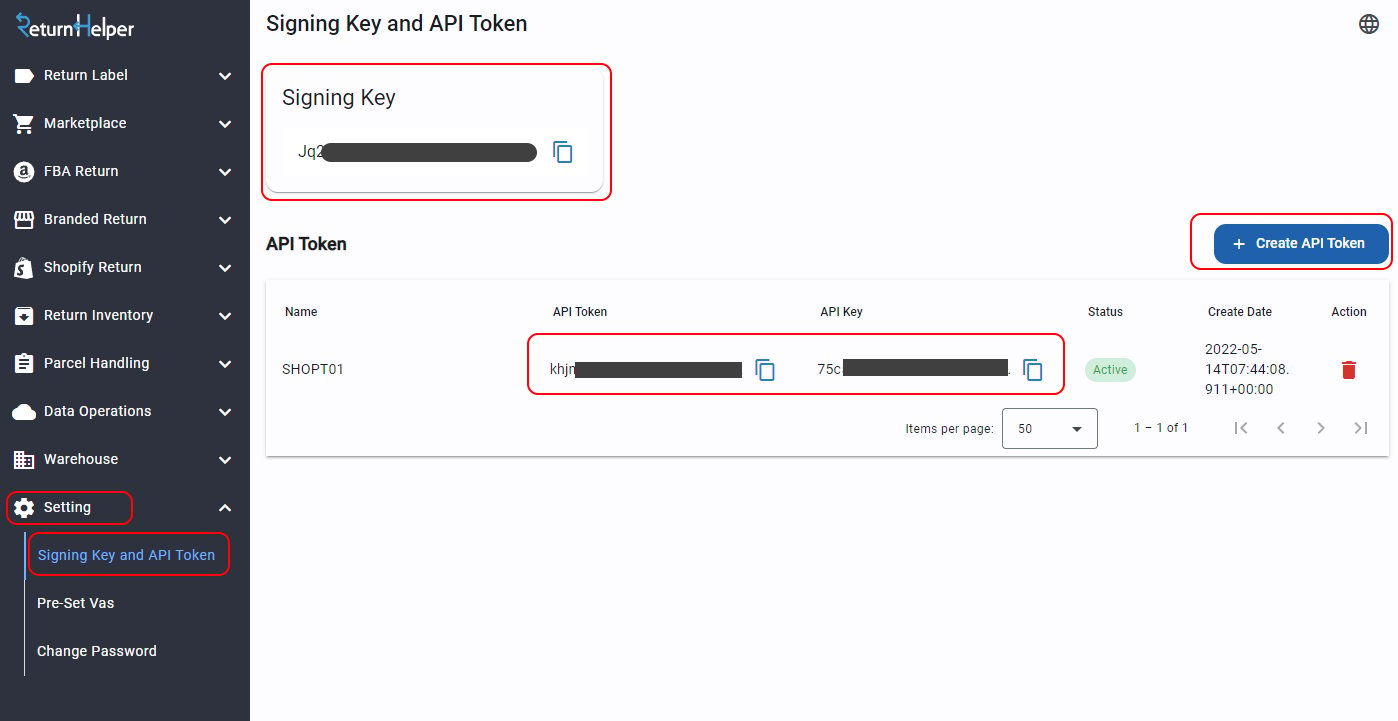 The same screen also shows your **signing key** (highlighted in the image above). This is a separate, Base64-encoded secret — it is **not** used to authenticate API requests. Instead, it verifies that incoming webhook notifications genuinely came from Return Helper. You can also read it programmatically with [Get signing key](/api-reference/apiaccount/get-signing-key). For how to use it, see [Webhooks → Signature Verification](/webhooks#signature-verification).
Your API token and signing key are private. Never share them or expose them in client-side code.
## Base URLs
### Sandbox
| Endpoint | Base URL |
| ---------- | ------------------------------------------ |
| User API | `https://api.returnshelper.com/uat/user` |
| Public API | `https://api.returnshelper.com/uat/public` |
### Production
| Endpoint | Base URL |
| ---------------- | ---------------------------------------------- |
| User API | `https://api.returnhelpercentre.com/v1/user` |
| User API (China) | `https://api.returnhelperchina.com/user` |
| Public API | `https://api.returnhelpercentre.com/v1/public` |
## Idempotency
For state-changing requests (creating return shipments, inventories, etc.), include an idempotency key to prevent duplicate operations in the event of network retries.
```http theme={null}
x-returnhelper-idempotency-key: YOUR_UNIQUE_KEY
```
Generate a fresh UUID (or similarly unique string) for each distinct transactional request. The server recognises repeated submissions of the same key and executes the operation only once, preserving data integrity.
## User-Agent Header
Include a `User-Agent` header so Return Helper support can identify your integration when investigating issues:
```
User-Agent: {app name}/{app version} (Platform={os version}; Runtime={runtime version}; Language={language})
```
Example:
```
User-Agent: CompanyABCApi/2024.16.0 (Platform=Unix/13.4.0; Runtime=8.0.2; Language=CSharp12)
```
A full request header looks like:
```http theme={null}
x-rr-apikey: YOUR_API_KEY
x-rr-apitoken: YOUR_API_TOKEN
Content-Type: application/json
x-returnhelper-idempotency-key: YOUR_UNIQUE_KEY
User-Agent: YourApp/1.0.0 (Platform=Linux/5.15; Runtime=8.0.2; Language=CSharp12)
```
## OpenAPI Specification
The full API specification is available as an OpenAPI 3.1 document. You can download it and import it directly into API clients such as Postman or Insomnia, or use it to generate client SDKs with tools like OpenAPI Generator.
`openapi.json` — OpenAPI 3.1
## Error Handling
Every response — success or failure — is wrapped in a common envelope:
```json theme={null}
{
"correlationId": "0HNL9S3BA31VM:00000001",
"meta": {
"status": 200,
"data": {},
"errorCode": null,
"error": {}
}
}
```
For successful calls the business payload is included as additional top-level fields alongside `correlationId` and `meta` (for example, `getAllCountries` returns `{ correlationId, meta, countries: [...] }`). Always check `meta.errorCode` before reading the payload — the API uses a soft-error convention where validation failures arrive as **HTTP 200** with `meta.status: 400` and a populated `meta.errorCode`.
### Failure modes
| Failure | Wire HTTP | Body |
| ----------------------------------------------------------------------- | --------- | ---------------------------------------------------------------------------------------------- |
| Missing or invalid `x-rr-apikey` / `x-rr-apitoken` | **401** | `meta.status: 401`, `meta.error.message` describes the auth failure |
| Validation failure (missing field, wrong type, business rule violation) | **200** | `meta.status: 400`, `meta.errorCode: "VALIDATION_FAILED"`, `meta.error` keyed by request field |
| Success | 200 | `meta.status: 200`, `meta.errorCode: null`, payload at top level |
### Sample — validation failure
```json theme={null}
{
"correlationId": "0HNLB2U6T1QG1:00000001",
"meta": {
"status": 400,
"data": {},
"errorCode": "VALIDATION_FAILED",
"error": {
"returnInventoryId": "'return Inventory Id' must not be empty."
}
}
}
```
Do not branch on the wire HTTP status alone. A `200 OK` response can still represent a logical failure — always inspect `meta.status` and `meta.errorCode`.
When integrating, log the `correlationId` from every response. Return Helper support uses it to trace requests when investigating issues.
For the full list of `meta.errorCode` values the API can emit — including business-rule errors like `TRACKING_ALREADY_EXIST`, `ACCOUNT_IS_BLOCKED`, and others not covered by the table above — see the [Error codes reference](/reference/error-codes).
## General Remarks
* All `dateTime` parameters must be in **ISO 8601** format, otherwise the API cannot parse them.
* Date string parameters (e.g. `createToStr`, `createFromStr`) must also be ISO 8601; the time portion is ignored.
* All timestamps returned by the API are in **UTC**.
## Webhooks
Label results and warehouse events (shipment arrival, inventory creation, image uploads, etc.) are delivered asynchronously via webhook notifications. You must register a notification endpoint to receive these events.
See the **Webhooks** section for the full list of notification event types and their payloads.
The same screen also shows your **signing key** (highlighted in the image above). This is a separate, Base64-encoded secret — it is **not** used to authenticate API requests. Instead, it verifies that incoming webhook notifications genuinely came from Return Helper. You can also read it programmatically with [Get signing key](/api-reference/apiaccount/get-signing-key). For how to use it, see [Webhooks → Signature Verification](/webhooks#signature-verification).
Your API token and signing key are private. Never share them or expose them in client-side code.
## Base URLs
### Sandbox
| Endpoint | Base URL |
| ---------- | ------------------------------------------ |
| User API | `https://api.returnshelper.com/uat/user` |
| Public API | `https://api.returnshelper.com/uat/public` |
### Production
| Endpoint | Base URL |
| ---------------- | ---------------------------------------------- |
| User API | `https://api.returnhelpercentre.com/v1/user` |
| User API (China) | `https://api.returnhelperchina.com/user` |
| Public API | `https://api.returnhelpercentre.com/v1/public` |
## Idempotency
For state-changing requests (creating return shipments, inventories, etc.), include an idempotency key to prevent duplicate operations in the event of network retries.
```http theme={null}
x-returnhelper-idempotency-key: YOUR_UNIQUE_KEY
```
Generate a fresh UUID (or similarly unique string) for each distinct transactional request. The server recognises repeated submissions of the same key and executes the operation only once, preserving data integrity.
## User-Agent Header
Include a `User-Agent` header so Return Helper support can identify your integration when investigating issues:
```
User-Agent: {app name}/{app version} (Platform={os version}; Runtime={runtime version}; Language={language})
```
Example:
```
User-Agent: CompanyABCApi/2024.16.0 (Platform=Unix/13.4.0; Runtime=8.0.2; Language=CSharp12)
```
A full request header looks like:
```http theme={null}
x-rr-apikey: YOUR_API_KEY
x-rr-apitoken: YOUR_API_TOKEN
Content-Type: application/json
x-returnhelper-idempotency-key: YOUR_UNIQUE_KEY
User-Agent: YourApp/1.0.0 (Platform=Linux/5.15; Runtime=8.0.2; Language=CSharp12)
```
## OpenAPI Specification
The full API specification is available as an OpenAPI 3.1 document. You can download it and import it directly into API clients such as Postman or Insomnia, or use it to generate client SDKs with tools like OpenAPI Generator.
`openapi.json` — OpenAPI 3.1
## Error Handling
Every response — success or failure — is wrapped in a common envelope:
```json theme={null}
{
"correlationId": "0HNL9S3BA31VM:00000001",
"meta": {
"status": 200,
"data": {},
"errorCode": null,
"error": {}
}
}
```
For successful calls the business payload is included as additional top-level fields alongside `correlationId` and `meta` (for example, `getAllCountries` returns `{ correlationId, meta, countries: [...] }`). Always check `meta.errorCode` before reading the payload — the API uses a soft-error convention where validation failures arrive as **HTTP 200** with `meta.status: 400` and a populated `meta.errorCode`.
### Failure modes
| Failure | Wire HTTP | Body |
| ----------------------------------------------------------------------- | --------- | ---------------------------------------------------------------------------------------------- |
| Missing or invalid `x-rr-apikey` / `x-rr-apitoken` | **401** | `meta.status: 401`, `meta.error.message` describes the auth failure |
| Validation failure (missing field, wrong type, business rule violation) | **200** | `meta.status: 400`, `meta.errorCode: "VALIDATION_FAILED"`, `meta.error` keyed by request field |
| Success | 200 | `meta.status: 200`, `meta.errorCode: null`, payload at top level |
### Sample — validation failure
```json theme={null}
{
"correlationId": "0HNLB2U6T1QG1:00000001",
"meta": {
"status": 400,
"data": {},
"errorCode": "VALIDATION_FAILED",
"error": {
"returnInventoryId": "'return Inventory Id' must not be empty."
}
}
}
```
Do not branch on the wire HTTP status alone. A `200 OK` response can still represent a logical failure — always inspect `meta.status` and `meta.errorCode`.
When integrating, log the `correlationId` from every response. Return Helper support uses it to trace requests when investigating issues.
For the full list of `meta.errorCode` values the API can emit — including business-rule errors like `TRACKING_ALREADY_EXIST`, `ACCOUNT_IS_BLOCKED`, and others not covered by the table above — see the [Error codes reference](/reference/error-codes).
## General Remarks
* All `dateTime` parameters must be in **ISO 8601** format, otherwise the API cannot parse them.
* Date string parameters (e.g. `createToStr`, `createFromStr`) must also be ISO 8601; the time portion is ignored.
* All timestamps returned by the API are in **UTC**.
## Webhooks
Label results and warehouse events (shipment arrival, inventory creation, image uploads, etc.) are delivered asynchronously via webhook notifications. You must register a notification endpoint to receive these events.
See the **Webhooks** section for the full list of notification event types and their payloads.