

Return Helper API
Return Helper provides a suite of APIs for managing e-commerce product returns end-to-end — from return request creation through shipment tracking, label generation, and warehouse processing.The API is designed for server-to-server integration only. Do not call these endpoints directly from client-side code.
Announcements
Rate limit: 1 request per second
From 1 November 2026The API will accept at most one request per second. Check your call rate before peak season.
Seller reference number on Create resend order
Action required if you set resendNumberResend search opens to every account.
resendNumber becomes read-only.New webhook event: Transaction added
From 5 October 2026Every charge, refund and top-up is sent to your webhook endpoint.
Consolidate Shipping replaces Recall
Action required if you use RecallSend inventory to the Hong Kong warehouse with Consolidate Shipping. Recall is retiring soon.
API rate limit: 1 request per second
From 1 November 2026, Return Helper enforces a rate limit of 1 request per second on the API, to enhance service stability for every integration through peak season.- Pace your calls so you send no more than one request per second.
- Use webhooks to receive shipment, inventory and resend updates instead of polling list endpoints.
Seller reference number on Create resend order
Create resend order (User API) will accept an optionalsellerReferenceNumber, as Create resend by SKU already does. Every account — not only Enterprise — will then be able to find resends with Search resend by seller reference number.
sellerReferenceNumber is optional, so existing integrations keep working. One change is breaking: resendNumber becomes a read-only value generated by Return Helper.
To migrate, between Milestone 1 and Milestone 2:
- Send your own reference in
sellerReferenceNumberinstead ofresendNumber. - If you match resend status update webhooks or your own records on
resendNumber, match onsellerReferenceNumberinstead.
resendNumber, sellerReferenceNumber is not unique — Return Helper does not reject a repeated value. To avoid duplicate resends when retrying, send an x-returnhelper-idempotency-key header.
We will publish the Milestone 1 date here and in the Changelog.
New webhook event: Transaction added
From 5 October 2026, Return Helper sends a Transaction added event to every registered webhook endpoint each time a transaction is posted to your account. You don’t need to register anything new. Transactions posted before 5 October 2026 are not sent.Consolidate Shipping replaces Recall
Consolidate Shipping can now ship to a Return Helper warehouse, and accepts FBA inventory by FNSKU.- Set
destinationType: RH_WAREHOUSEand adestinationWarehouseIdfrom Get all warehouses whoseisConsolidateShippingDestinationistrue. The Hong Kong warehouse is currently the only such destination. - No quote step: each shipment’s fee is charged when it arrives, reported by the Consolidate shipment arrived webhook.
- Custom address orders work as before.
shippingMethodis removed from requests and responses; use the optionalpackagingTypeinstead. Webhook payloads before version202609still carryshippingMethod, alwaysnull. - Consolidate shipping webhooks now list FNSKU lines in each box, with
itemType,fnskuandquantity.returnInventoryIdandrmaarenullon FNSKU lines. - See Consolidate Shipping flow for every step between you and the warehouse.
Changelog
- Announced: Transaction added webhook event, sent from 5 October 2026. See the announcement.
- Ship a consolidate shipping order to a Return Helper warehouse with
destinationType: RH_WAREHOUSE, and add FBA inventory by FNSKU. - New: Get consolidate shipping order, Confirm consolidate shipping quote, Mark ready to ship, Update packaging type.
- New webhook: Consolidate shipment arrived (version
202609). - New: Consolidate Shipping flow guide, and Get FNSKUs of a merge fee transaction.
- Consolidate shipping webhooks list FNSKU lines;
shippingMethodin webhook payloads is alwaysnull. - Removed:
shippingMethod, Update shipping method, and Get all consolidate shipping methods. - Announced: Recall is retiring soon.
- Cancel a return label with Cancel return label. To correct a shipment, cancel its label and create a new return shipment.
- Announced: API rate limit of 1 request per second, effective 1 November 2026.
- Announced:
sellerReferenceNumberon Create resend order;resendNumberwill become read-only.
- Manage your webhook notification endpoints yourself with Add a notification endpoint, List notification endpoints and Delete a notification endpoint.
Available APIs
User API — Authenticated endpoints for merchants and partners to manage return requests, shipments, labels, inventory, and account settings. Public API — Reference data endpoints exposing lookup values such as service types, warehouse lists, status codes, and supported countries.Authentication
All API requests require an API key and token passed as request headers:- Log in to the Return Helper User Portal.
- Go to Settings → Signing Key and API Token.
- Your existing key-token pairs are listed here. You can also generate a new pair.
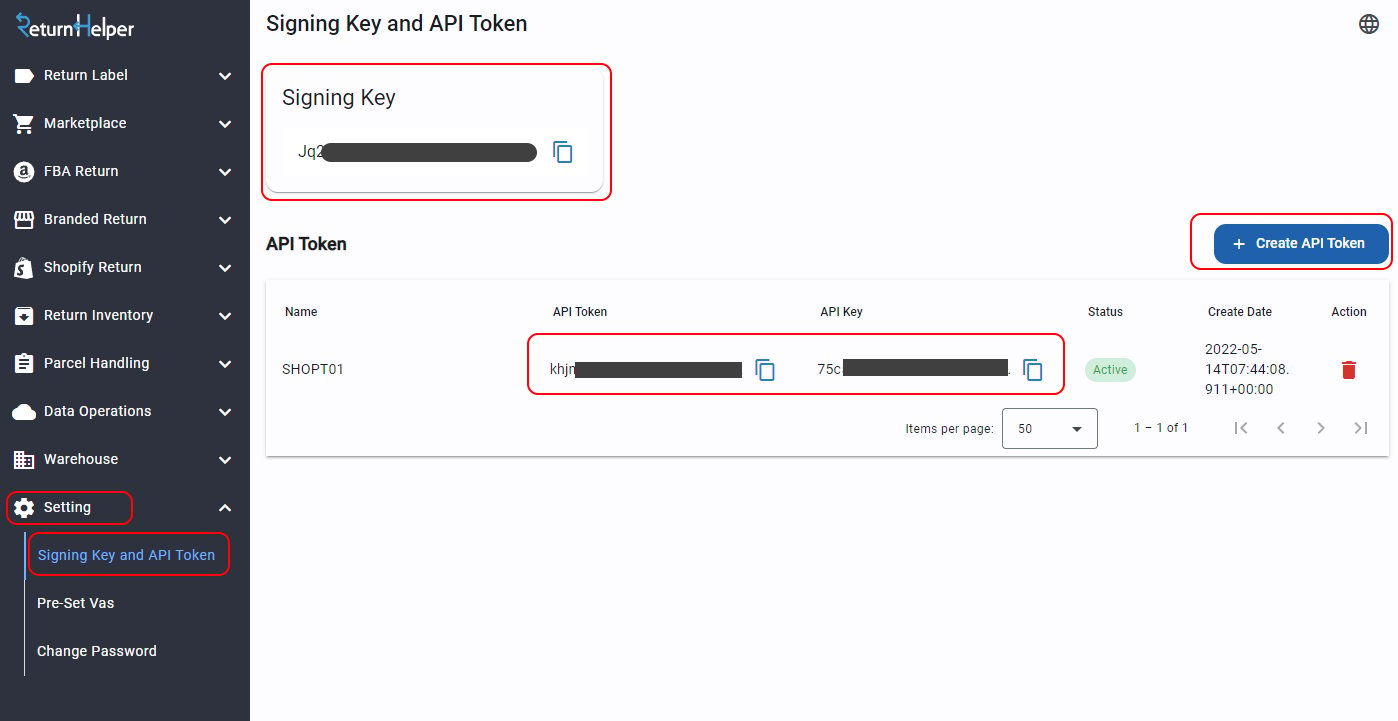
Signing Key, API Token and API Key in the User Portal
Base URLs
Sandbox
Production
Idempotency
The endpoints below accept anx-returnhelper-idempotency-key header, so that a retried request is processed only once.
Other endpoints ignore the header.
User-Agent Header
Include aUser-Agent header so Return Helper support can identify your integration when investigating issues:
OpenAPI Specification
The full API specification is available as an OpenAPI 3.1 document. You can download it and import it directly into API clients such as Postman or Insomnia, or use it to generate client SDKs with tools like OpenAPI Generator.Download OpenAPI Specification
openapi.json — OpenAPI 3.1Error Handling
Every response — success or failure — is wrapped in a common envelope:correlationId and meta (for example, getAllCountries returns { correlationId, meta, countries: [...] }). Always check meta.errorCode before reading the payload — the API uses a soft-error convention where validation failures arrive as HTTP 200 with meta.status: 400 and a populated meta.errorCode.
Failure modes
Sample — validation failure
correlationId from every response. Return Helper support uses it to trace requests when investigating issues.
For the full list of meta.errorCode values the API can emit — including business-rule errors like TRACKING_ALREADY_EXIST, ACCOUNT_IS_BLOCKED, and others not covered by the table above — see the Error codes reference.
General Remarks
- All
dateTimeparameters must be in ISO 8601 format, otherwise the API cannot parse them. - Date string parameters (e.g.
createToStr,createFromStr) must also be ISO 8601; the time portion is ignored. - All timestamps returned by the API are in UTC.
Webhooks
Label results and warehouse events (shipment arrival, inventory creation, image uploads, etc.) are delivered asynchronously via webhook notifications. You must register a notification endpoint to receive these events. See the Webhooks section for the full list of notification event types and their payloads.Contact Technical Support
For technical questions or integration issues, email support@returnhelper.com. Include the following so we can investigate:- The
correlationIdfrom the response - The environment (sandbox or production) and the endpoint you called
- The time of the request, including the time zone
- The request body and the response you received